一人称視点での移動方法
このアプリケーションは、ファーストパーソンでのキャラクター移動を実装しています。
このコントローラのシーン設定は重要です。キャラクターは、スクリプトがアタッチされた上にRigidBodyとCollisionコンポーネントを持つ必要があります。また、このスクリプトは、カメラエンティティをプレイヤーの子としてインスペクタに手動で設定することもできます。カメラエンティティが存在しない場合、新しいエンティティが作成されます。
Tutorial Projectで全シーン設定を確認してください。
以下のスクリプトは、以下の機能を実行します。
- マウスとキーボードの入力を受け取る
- マウスの入力からカメラエンティティを更新する
- 重力を適用してプレイヤーエンティティをシーン内で移動する
注意:プレーヤーの速度は直接設定されず、applyForceを使用して力を加えることで移動されます。
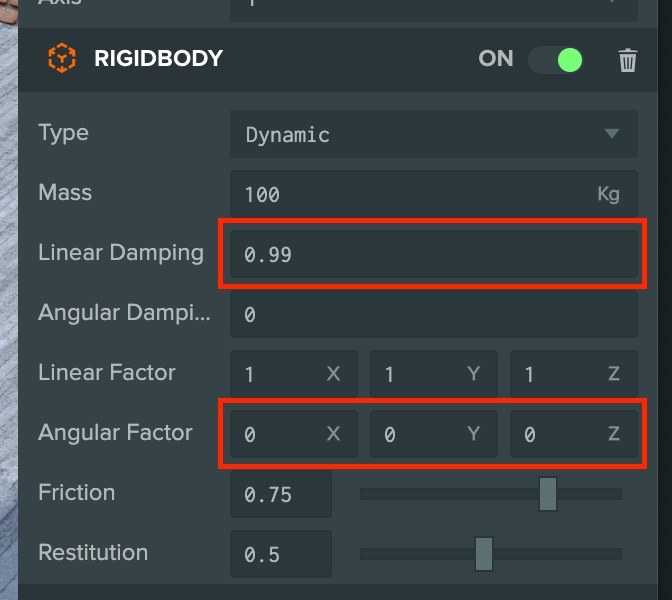
RigidBodyコンポーネントでは、以下の値がエディタインスペクタに設定されています。
- 最大速度を制限するには、プレイヤーが入力キーを離した後にプレイヤーがスライドしないように線形減衰を適用します。
- プレイヤーが転がってしまうのを防ぐため、すべての軸の角度要素を0に減らしました。
- ESM
- Classic
import { Script, Vec3, Entity, Mouse, BODYTYPE_DYNAMIC } from 'playcanvas';
import { KEY_A, KEY_Q, KEY_D, KEY_W, KEY_S } from 'playcanvas';

export class FirstPersonMovement extends Script {
    static scriptName = "firstPersonMovement";

    /**
     * Optional, assign a camera entity, otherwise one is created.
     *
     * @attribute
     * @title Camera
     * @type {Entity}
     */
    camera = null;

    /**
     * Adjusts the speed of player movement.
     *
     * @attribute
     * @title Power
     * @type {number}
     */
    power = 2500;

    /**
     * Adjusts the sensitivity of looking.
     *
     * @attribute
     * @title Look Speed
     * @type {number}
     */
    lookSpeed = 0.25;

    // initialize code called once per entity
    initialize() {
        this.force = new Vec3();
        this.eulers = new Vec3();

        const app = this.app;

        // Listen for mouse move events
        app.mouse.on("mousemove", this._onMouseMove, this);

        // when the mouse is clicked hide the cursor
        app.mouse.on("mousedown", () => {
            app.mouse.enablePointerLock();
        });

        // Check for required components
        if (!this.entity.collision) {
            console.error("First Person Movement script needs to have a 'collision' component");
        }

        if (!this.entity.rigidbody || this.entity.rigidbody.type !== BODYTYPE_DYNAMIC) {
            console.error("First Person Movement script needs to have a DYNAMIC 'rigidbody' component");
        }
    }

    // update code called every frame
    update(dt) {
        // If a camera isn't assigned from the Editor, create one
        if (!this.camera) {
            this._createCamera();
        }

        const force = this.force;
        const app = this.app;

        // Get camera directions to determine movement directions
        const forward = this.camera.forward;
        const right = this.camera.right;


        // movement
        let x = 0;
        let z = 0;

        // Use W-A-S-D keys to move player
        // Check for key presses
        if (app.keyboard.isPressed(KEY_A) || app.keyboard.isPressed(KEY_Q)) {
            x -= right.x;
            z -= right.z;
        }

        if (app.keyboard.isPressed(KEY_D)) {
            x += right.x;
            z += right.z;
        }

        if (app.keyboard.isPressed(KEY_W)) {
            x += forward.x;
            z += forward.z;
        }

        if (app.keyboard.isPressed(KEY_S)) {
            x -= forward.x;
            z -= forward.z;
        }

        // use direction from keypresses to apply a force to the character
        if (x !== 0 || z !== 0) {
            force.set(x, 0, z).normalize().scale(this.power);
            this.entity.rigidbody.applyForce(force);
        }

        // update camera angle from mouse events
        this.camera.setLocalEulerAngles(this.eulers.y, this.eulers.x, 0);
    }

    _onMouseMove(e) {
        // If pointer is disabled
        // If the left mouse button is down update the camera from mouse movement
        if (Mouse.isPointerLocked() || e.buttons[0]) {
            this.eulers.x -= this.lookSpeed * e.dx;
            this.eulers.y -= this.lookSpeed * e.dy;
        }
    }

    _createCamera() {
        // If user hasn't assigned a camera, create a new one
        this.camera = new Entity();
        this.camera.setName("First Person Camera");
        this.camera.addComponent("camera");
        this.entity.addChild(this.camera);
        this.camera.translateLocal(0, 0.5, 0);
    }
}
var FirstPersonMovement = pc.createScript('firstPersonMovement');

FirstPersonMovement.attributes.add('camera', {
    type: 'entity',
    description: 'Optional, assign a camera entity, otherwise one is created'
});

FirstPersonMovement.attributes.add('power', {
    type: 'number',
    default: 2500,
    description: 'Adjusts the speed of player movement'
});

FirstPersonMovement.attributes.add('lookSpeed', {
    type: 'number',
    default: 0.25,
    description: 'Adjusts the sensitivity of looking'
});

// initialize code called once per entity
FirstPersonMovement.prototype.initialize = function() {
    this.force = new pc.Vec3();
    this.eulers = new pc.Vec3();

    var app = this.app;

    // Listen for mouse move events
    app.mouse.on("mousemove", this._onMouseMove, this);

    // when the mouse is clicked hide the cursor
    app.mouse.on("mousedown", function () {
        app.mouse.enablePointerLock();
    }, this);

    // Check for required components
    if (!this.entity.collision) {
        console.error("First Person Movement script needs to have a 'collision' component");
    }

    if (!this.entity.rigidbody || this.entity.rigidbody.type !== pc.BODYTYPE_DYNAMIC) {
        console.error("First Person Movement script needs to have a DYNAMIC 'rigidbody' component");
    }
};

// update code called every frame
FirstPersonMovement.prototype.update = function(dt) {
    // If a camera isn't assigned from the Editor, create one
    if (!this.camera) {
        this._createCamera();
    }

    var force = this.force;
    var app = this.app;

    // Get camera directions to determine movement directions
    var forward = this.camera.forward;
    var right = this.camera.right;


    // movement
    var x = 0;
    var z = 0;

    // Use W-A-S-D keys to move player
    // Check for key presses
    if (app.keyboard.isPressed(pc.KEY_A) || app.keyboard.isPressed(pc.KEY_Q)) {
        x -= right.x;
        z -= right.z;
    }

    if (app.keyboard.isPressed(pc.KEY_D)) {
        x += right.x;
        z += right.z;
    }

    if (app.keyboard.isPressed(pc.KEY_W)) {
        x += forward.x;
        z += forward.z;
    }

    if (app.keyboard.isPressed(pc.KEY_S)) {
        x -= forward.x;
        z -= forward.z;
    }

    // use direction from keypresses to apply a force to the character
    if (x !== 0 || z !== 0) {
        force.set(x, 0, z).normalize().scale(this.power);
        this.entity.rigidbody.applyForce(force);
    }

    // update camera angle from mouse events
    this.camera.setLocalEulerAngles(this.eulers.y, this.eulers.x, 0);
};

FirstPersonMovement.prototype._onMouseMove = function (e) {
    // If pointer is disabled
    // If the left mouse button is down update the camera from mouse movement
    if (pc.Mouse.isPointerLocked() || e.buttons[0]) {
        this.eulers.x -= this.lookSpeed * e.dx;
        this.eulers.y -= this.lookSpeed * e.dy;
    }
};

FirstPersonMovement.prototype._createCamera = function () {
    // If user hasn't assigned a camera, create a new one
    this.camera = new pc.Entity();
    this.camera.setName("First Person Camera");
    this.camera.addComponent("camera");
    this.entity.addChild(this.camera);
    this.camera.translateLocal(0, 0.5, 0);
};